Confluence 4 — wiki markup is *dead*, _long live_ wiki markup
by David. Average Reading Time: less than a minute.
People have been shouting from the rooftops that Confluence 4 has finally arrived. Despite all the hype, it’s a cracking release. I’m not going to list all the features here, as you can find them elsewhere. However I will mention one…
The new editor
Simply put, it’s fast, slick and gorgeous looking. It works better than any online editor I’ve used elsewhere. It is a design that would make Antoine de Saint-Exupéry proud.
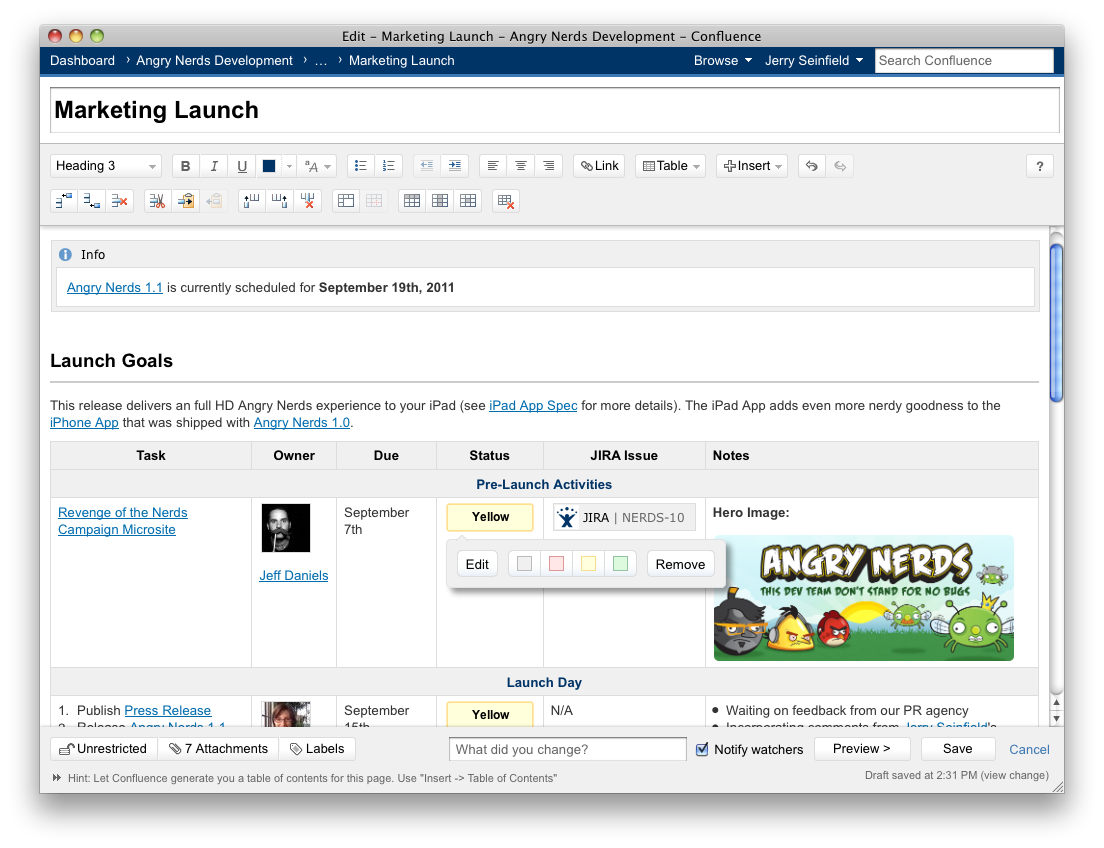
Wiki markup is dead
Past experience shows that people’s fondness of wiki markup is somewhat akin to that of Marmite. So it seems quite a bold step to ditch this aspect of the editor for something completely new.
Long live wiki markup
The good news is that behind the scenes, wiki markup is alive and well — all the new editor’s great keyboard shortcuts are based off of the syntax that many people know so well.
The final irony being that wiki markup haters may just start using wiki markup in their “faster, richer, simpler” editing experience.
Now, see what I mean:


I will strongly oppose any “upgrade” to confluence 4 unless I can continue to use markup. For about a decade I’ve been editing wiki pages in a real editor like Vim or Textmate, then pasting the markup I need into Confluence (or whatever other wiki I happen to be using). Losing markup means I lose all of the global/search/replace keystroke, external filters, command input and other features that a real editor provides.
Do you have any path that allows power users to keep their power? This is leaves me cold.
Absolutely! I still do the same when I haven’t got an internet connection.
Write up your text in wiki markup in TextMate. When it’s completed, in the editor insert Wiki Markup:
Insert wiki markup screenshot
You know what? The editor is *not* gorgeous. It’s like Word was back in 1997 – annoying.
For example, I wanted to have a line whereby the first part is normal formatted, and the latter part is in pre-formatted. Can you do it? No.
I want to have a list of items whereby they aren’t separated by spaces, not part of a bullet list or anything else. Just a list of file names. Can I do it? No.
Press ‘delete’ at the end of a line whereby the next line is a heading 1. Oh thanks, you’ve just made the entire paragraph ‘heading 1′. Brilliant.
I really enjoyed using confluence before v4, now i’m just frustrated, and wondering where I have taken a time machine back to 1997.
Gorgeous – more appropriately DREADFUL. Deletes text whenever it feels like it. No fine grain control, Try finding out why text appears on a row within a table, when the other text appears on the row above. Looking nice is the last thing, functional is the first thing the editor should be, and it falls short.
Having used it solidly since September, I’d say that it’s definitely not perfect, there are some glitches. I do use “Insert wiki markup” a lot. You only have to go here to see that the more advanced geek editors are not completely satisfied.
I’d expect the next few versions to have some major improvements, but it’s still a *much* better, much more powerful editor than the competition has to offer.
I thought this was for comments, NOT complaining 1,000,000 times
I haven’t used the new editor, but one thing I know from long experience is that WYSIWIG editors for wikis are a disaster – creating horrendous markup to the point where pages become so uneditable that I have to cut and paste the text out and start again.
Of course this is not just confined to WSYIWIG wiki editors as anyone who has had to clean up the bastardised HTML that Word produces will attest.
So I think that taking out wiki markup is a Really Bad Idea(TM) until your editor has been proven.
Drekka: I stand by my blogpost especially this important point:
Both wiki markup and RTEs have their limitations. The good news is that the Confluence editor is constantly being improved, whereas wiki markup seems to me to have reached it’s natural limit.
I’ll also say that the Confluence 4.0 editor wasn’t perfect, but hell neither is wiki markup. I mean, what kind of masochist wants to type out that nonsense all day long?
The Confluence 4.1 editor is way better than the 4.0 editor, so I think most of the haters will eventually upgrade. Maybe not just yet though.
Also see that there will be a new source editor, so the vendor continues to listen to criticism.
“”I’ll also say that the Confluence 4.0 editor wasn’t perfect, but hell neither is wiki markup. I mean, what kind of masochist wants to type out that nonsense all day long?”"
Either of two persons:
* The one who wan’t full control over what he actually writes so that he can control the outcome better.
* The one who doesn’t care for how things looks at all but would rather focus on the content. You know, that thing that is actually important when we author stuff?
Many who complain about WIKI markup, has in my mind not understood it’s purpose… the ways we have been bending wiki markup the later years to gain more “rich-and-flashy-looking-messed-up-less-readable-content” is a horrified misuse of wiki to me…
That’s not said that those kinds of pages does not have a place in the world, but wanting to constructing them in wiki is where we go wrong IMO.
I am currently converting from RTE (Windows Live Writer) to a Wiki syntax for my own blog because it lets me focus on the content over the layout, so I guess I am one of those that would wan’t to write that stuff up and down all day…
David, since you’re one of the few who have expressed a positive response for the new editor on the Confluence 4 Feedback page (or rather, you’re linked to from there) … I’m curious as to whether you’re still such a big fan of it.
Most of the new users agree that *entering* text isn’t that bad, but maintaining and editing are (to put it kindly) “awkward” at best.
Overall, yes. Though I still often use the paste wiki markup feature
There are still a few snags (eg selecting tables), but the editor has come a long way since the initial 4.0 release.
I wouldn’t go back.
In the past year, I’ve worked with three very large organizations having in total well in excess of 30,000 Confluence users. You know what? They, like I, are sticking with the last release of version 3 due to the lack of wiki markup editor support. I know of several large universities that are taking the same tack.
Atlassian, you’re not listening to your user base!
WYSIWYG is fine for the non knowledge workers. But this was one of the drivers away from Micro$oft and $harepoint to Confluence in the first place.
The new editor …gorgeous looking?
Have you actually used it???
I need a functional editor, I don’t care what it looks like.
Try creating a table with 3 columns and 200 rows. The first 2 columns need to be in fixed width font. Do you really think its “slick” to have to select 2 cells, go to the TextStyle dropdown box, select “preformatted” and repeat this sequence 199 times? This took about 2h!!!
In a real editor, or even a shell script, I can do the markup formatting in 1 minute!
Manfred: I’ve used it, and I like it. Just like wiki markup, its not perfect, but in my opinion it’s still very good.
This seems to be a common trend nowadays: it’s more important that the interface is good looking and “slick” rather than a usable one. Yes, the new interface works smoothly in your demo, but what happens when you actually try to do some work with it? DISASTER.
Manfred pointed out an excellent example, and I have the same situation. We have our system documentation in Confluence and in contains a LOT of large tables. Until now I used Notepad++ and macros to edit the data, but now it’s a real pain (you can only INSERT wiki markup but can’t EDIT it!).
And as many have already pointed out, I also do not care how the interface looks, I just want to get my workd done as fast as I can and Confluence HAS helped me to do that. Now the Confluence is just another dreadful thing I have to live with and I don’t like it at all